> For the complete documentation index, see [llms.txt](https://maiv.gitbook.io/maiv-finance/llms.txt). Markdown versions of documentation pages are available by appending `.md` to page URLs; this page is available as [Markdown](https://maiv.gitbook.io/maiv-finance/the-maiv-investment-platform/memberships.md).
# Memberships
Next up, claim your membership!
[$MAIV](https://x.com/search?q=%24MAIV\&src=cashtag_click) on Base: 0x4b82ac0d1531290e3edb3abe9a985623bf7edaee
[$MAIV](https://x.com/search?q=%24MAIV\&src=cashtag_click) on Eth: 0x39903a1a6f289a67e0de94096915c4ccd506ab2a
Memberships are your key to the MAIV Investment Platform. You will need at least the lowest tier of membership to invest in opportunities on the MAIV platform. You will not be able to invest without a membership.
But on top of this, they bring a plethora of bonuses and perks, which include staking multipliers and access to exclusive investment opportunities, depending on your tier. Check out more on that [here](/maiv-finance/overview/maiv-membership-program.md).
Let's head to the 'Account' tab in the top right - if you're following our signup guide you should already be here. Then, select 'Upgrade Membership'.
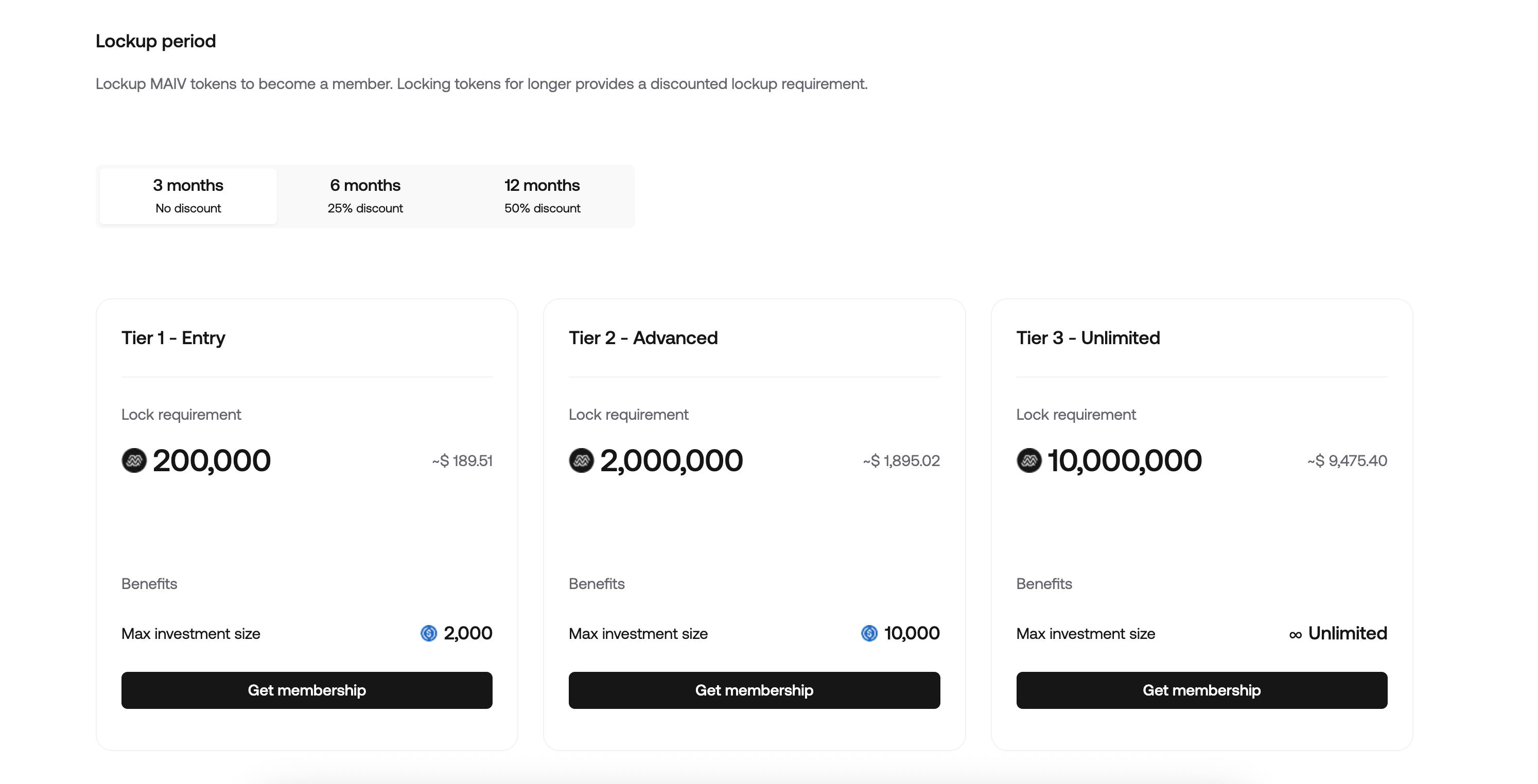
You'll see the memberships interface here. Each membership requires you to lock MAIV for a minimum duration. The minimum duration is 3 months, but the longer you lockup, the larger your discount is on the membership tier you want. For example, if you lock for 12 months, you receive a 50% discount.
***EDIT 05th Jan 2026** - We previously stated in the paragraph below that membership tokens were automatically staked, we apologize as this was an error, memberships do give staking multipliers but do not yield staking rewards. Read below for the updated information.*\
\
Tokens you lock for memberships are additional to staked tokens and do not accrue staking rewards, but you can add tokens to staking separately. Some tiers also give you a multiplier on your staking rewards.
We won't deep dive into the membership tier benefits here as these are explained in detail in our [MAIV Membership Program page](/maiv-finance/overview/maiv-membership-program.md), but feel free to look through the tiers here and select one which suits your investment size goal, and your desired lockup duration. \
\
Once you've decided, click 'Get membership'. Remember, you can upgrade memberships, but you can't 'downgrade' once you've locked a membership in.
You'll now see this screen. It shows the amount you're locking, the duration, the fiat equivallent at current market rates, and your 'benefits' - which includes the max investment size you can make in investment opportunities on the MAIV platform.
Once you're happy, click 'Lock XXX,XXX MAIV', and follow the prompts in your connected wallet to lock in your membership.
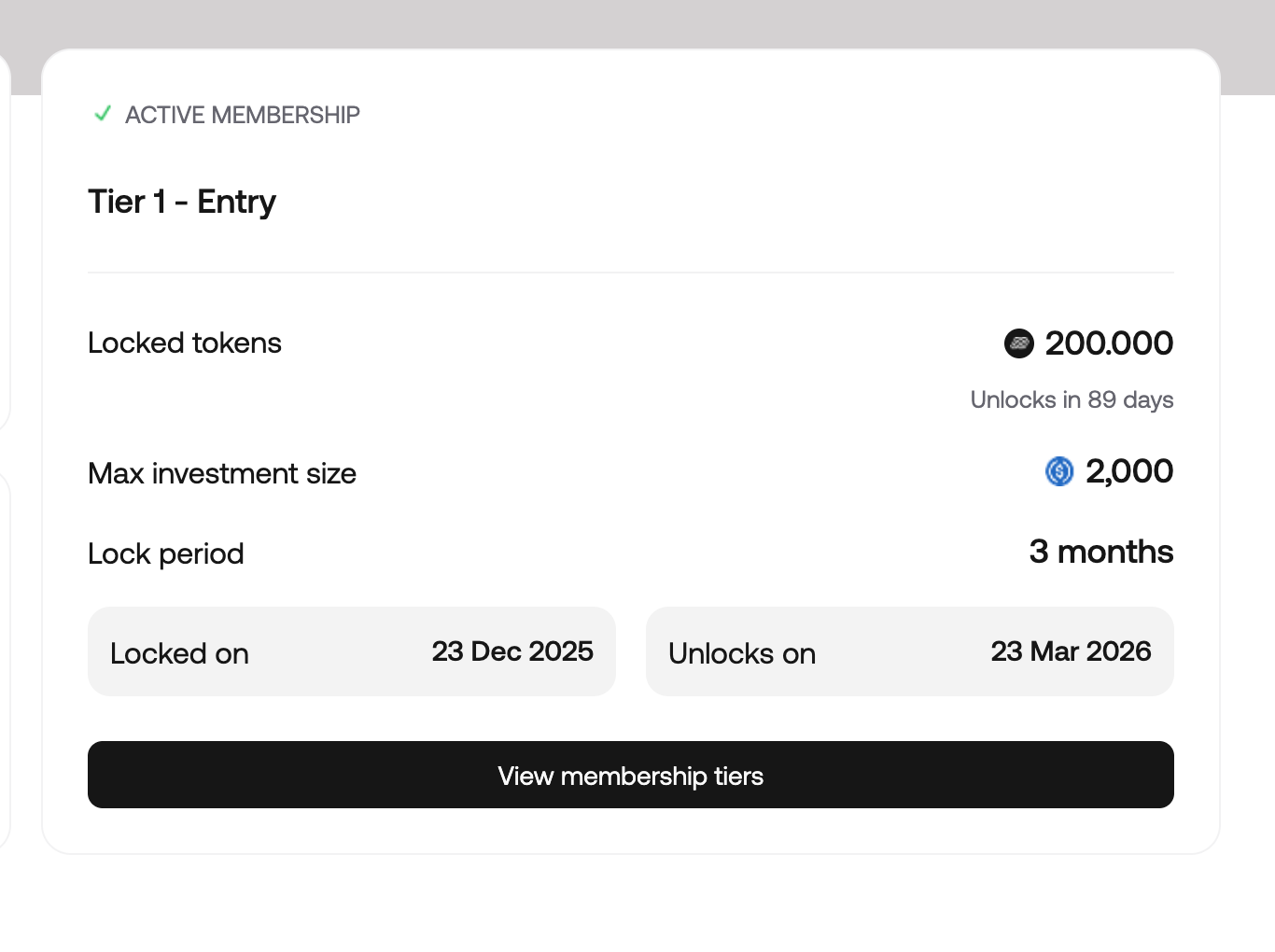
You'll now be taken to this page where you should see a success banner, indicating you have an active membership!
If you head back to the 'Account' tab, you will also see your membership reflected here.
And, finally, if you head to the 'Staking' tab, you will see your membership staking balance shown in the interface.
You can stake above and beyond your membership staking balance. For example, as you can see in the screenshot below, we have 200,000 MAIV staked for our membership, and an additional 20 MAIV staked through single staking. You may stake as much MAIV through single staking as you like.
Also note the rewards multiplier. In our example, we have access to a 1.25x rewards multiplier by virtue of our membership tier. This goes all the way to 2x for the highest memberships with the longest lockups.
Congratulations! You now have a membership. Now, let's take a closer final look at staking.